

Decoding the Dashboard: How AdSense Impressions, CPC, CTR, Clicks, and RPM Affect Your Earnings
Written By Saad and Thestrategicpost Team – 22/11/2025
Receiving approval for Google AdSense is a major milestone for any blogger or publisher. However, once the approval is secured, the dashboard often presents a baffling array of metrics that can lead to significant confusion. Terms like Page Views, RPM, Impressions, Clicks, and CTR are crucial for understanding and optimizing revenue, but deciphering their true meaning and learning how to read them correctly is often the biggest hurdle.
This comprehensive guide draws directly from expert analysis to demystify these key Google AdSense terminologies, explain the subtle yet vital differences in data tracking, and provide actionable insights into how these metrics influence your bottom line. If you are looking to increase your earnings—whether it is your Today So Far earnings, Yesterday’s earnings, 7-day earnings, or monthly earnings—mastering these metrics is essential.
The Fundamental Metrics: Defining the Core of AdSense Performance
Understanding your AdSense revenue starts with recognizing five fundamental metrics: Page Views, Impressions, Clicks, Cost Per Click (CPC), Revenue Per Mille (RPM), and Click-Through Rate (CTR).
1. The Page View Paradox: AdSense vs. Analytics
When you look at your website statistics, one of the first discrepancies you may notice is the major variation in Page Views shown between Google Analytics and Google AdSense. Why does Google Analytics display one number for Page Views, while Google AdSense displays a different one?
A Page View is generally understood as the loading of a blog post after a user clicks on it. However, the definition depends entirely on the tracker being used.
Google Analytics Page View: In the case of Google Analytics, a Page View is counted simply if a user loads your page.
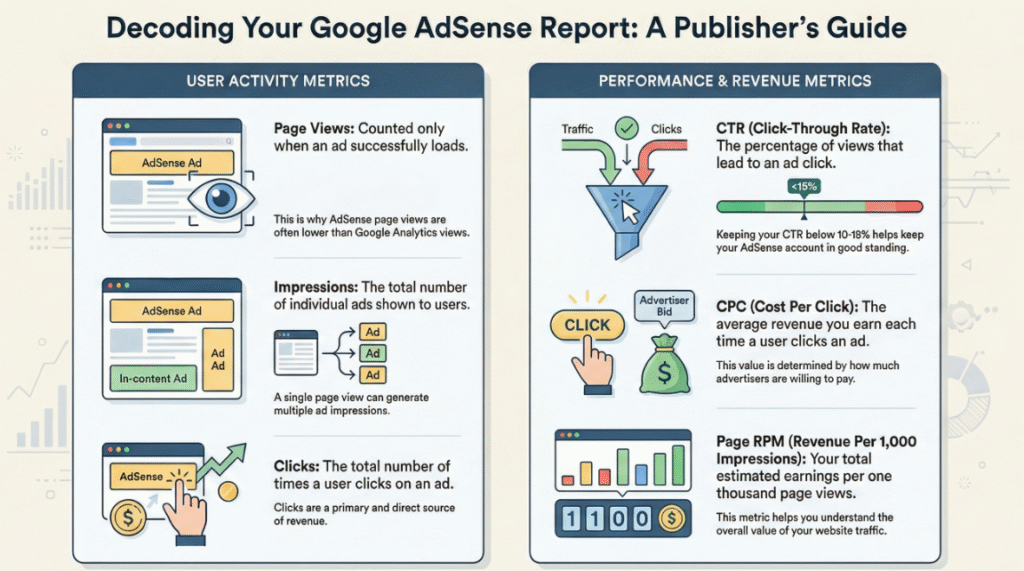
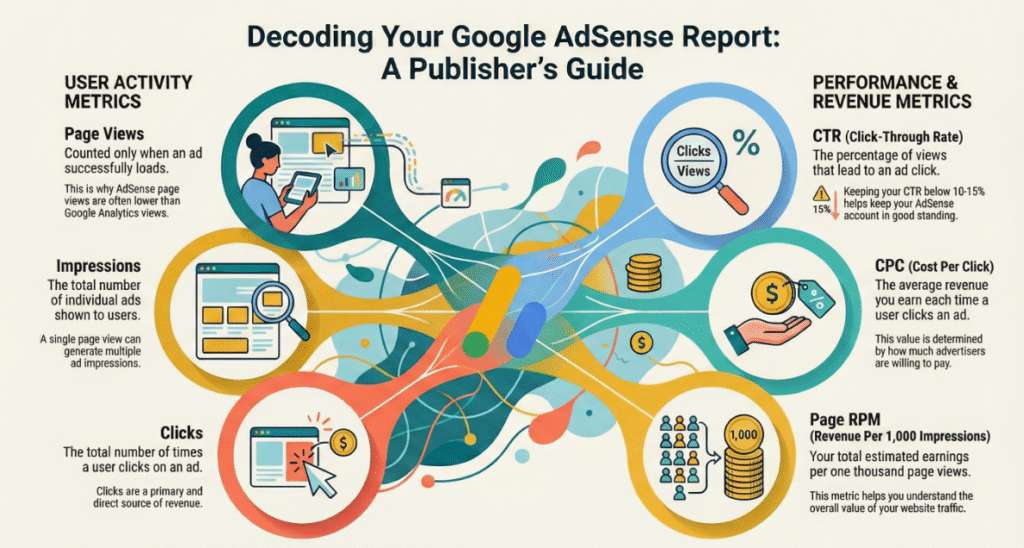
Google AdSense Page View: Google AdSense uses a stricter definition. A Page View is only counted when the loaded page successfully displays at least one advertisement. If a page loads but no ads appear, it does not count as a Page View in the AdSense dashboard.
This difference in tracking methodology is the reason for the variation you see between the stats in Google Analytics and Google AdSense. For example, a dashboard might show 5.1K (5,100) Page Views. This metric only represents the number of pages loaded where an ad was successfully shown. It is a critical distinction that many new publishers are unaware of.
2. Impressions: The Measure of Ad Visibility
Once we understand Page Views, the concept of Impressions becomes clear. Impressions reflect the total number of times advertisements were displayed to users.
It is important to remember that one single Page View can generate multiple Impressions. For example, if a user loads one page (counting as one Page View), and that page features three different advertisements—one here, one there, and another here—this single Page View results in three ad Impressions.
The number of Impressions is determined by how many ads are placed on your site and how many of those ads successfully display during the user’s Page View duration.
Calculating Impressions: If 100 users visit your site (meaning 100 Page Views if ads load), and every page loads four ads, you will achieve 400 Impressions (100 users multiplied by 4 ads). Conversely, if only three ads load on some pages, the total Impression count would be slightly lower. A dashboard example might show 9,800 Impressions.
In essence, Impressions measure how often the advertisements themselves are shown, regardless of how many pages the user looked at, given that the ads loaded successfully.
3. Clicks and CPC: The Direct Revenue Streams
Clicks and Cost Per Click (CPC) are intrinsically linked to the money generated.
Clicks: A Click is simply counted when a user visits your page and clicks on an advertisement that is displayed. For instance, if an AdSense account has received six clicks overall, the Clicks number in the dashboard will display ‘6’. Over a longer period, such as a month, this number could climb much higher than 100. The Clicks matrix helps calculate how many times users interacted with the ads.
CPC (Cost Per Click): CPC stands for Cost Per Click. This metric represents the average amount of money an advertiser is willing to pay for a single click on their advertisement.
To understand CPC, we must consider how Google AdSense charges advertisers:
- Impressions: Advertisers pay a smaller amount of money simply for showing their ad a set number of times (e.g., for every 1,000 views).
- Clicks: Advertisers pay significantly more if a user actually clicks on the advertisement. Revenue generated from clicks is always higher compared to revenue from impressions.
CPC is the average amount paid by various advertisers for the clicks received. For example, if one advertiser was willing to pay 67 cents, and another 70 cents, the overall average CPC derived from the six clicks might be 43 cents. This figure represents the average revenue received for each click.
4. RPM: The Thousand-Visitor Revenue Benchmark
Because a website receives thousands of Impressions and thousands of Clicks, a single average metric is needed to calculate the combined average earning potential. This brings us to RPM, or Revenue Per Mille (Mille meaning thousand).
RPM is the valuable matrix that indicates how much money you have earned, on average, for every 1,000 users who visited your site. This calculation combines the revenue generated from Impressions and the revenue generated from Clicks.
Understanding RPM: If your RPM is 50 cents, this means that for every 1,000 users who visited your site, the average revenue generated from all ad displays (Impressions) and user interactions (Clicks) combined was 50 cents.
Optimizing RPM: If a publisher wants to increase their overall RPM, the primary focus must be on increasing the site’s CPC (Cost Per Click). There are detailed strategies available on how CPC is calculated and how it can be enhanced.
5. CTR: The Performance Indicator and Safety Measure
The final crucial metric is CTR, or Click-Through Rate.
CTR is a percentage calculation that tells you the frequency of clicks relative to the number of Page Views. It is calculated by dividing the total number of Clicks by the total number of Page Views, and then multiplying that result by 100.
Formula Example: If you have 6 Clicks and 5,100 Page Views, dividing 6 by 5,100 and multiplying by 100 results in a CTR of 0.12%.
CTR serves as a helpful matrix to find out which ads are receiving the most clicks on your site. If your goal is to genuinely increase your revenue, you should focus on maximizing your CTR.
Safety Guidelines for CTR: The CTR is not just a performance indicator; it is also a safety measure for your AdSense account. To ensure your AdSense account remains completely safe and to avoid the potential for policy violation errors, the CTR should ideally remain within the range of 10% to 15%. This range indicates a healthy and organic click rate. For example, if 100 people visit your site and only two ads are clicked, your CTR is 2%.
Comprehensive Summary of Metrics
To summarise the core concepts:
| Metric | Definition | Revenue Contribution | Calculation Nuance |
|---|---|---|---|
| Page Views (PV) | When a user visits a page and at least one ad is successfully loaded and displayed on that page. | Baseline for Impression/Click eligibility. | Different from Google Analytics (which counts any page load). |
| Impressions | The total number of times an ad is displayed to the user. | Generates revenue based on the number of times the ad is seen. | One PV can equal multiple Impressions, depending on the number of ad units. |
| Clicks | The number of times users click on a displayed ad. | Generates higher revenue than Impressions. | Key input for calculating CPC and CTR. |
| CPC | Cost Per Click; the average revenue earned per click. | Direct revenue metric for interactions. | Average cost set by advertisers. |
| RPM | Revenue Per Mille; the average revenue earned per 1,000 visitors (combining Impressions and Clicks revenue). | Overall performance benchmark. | A valuable matrix for evaluating site earning potential. |
| CTR | Click-Through Rate; the percentage of clicks compared to Page Views. | Indicates ad performance and user engagement. | Clicks / Page Views x 100. Safe range is generally 10% to 15%. |
By gaining a crystal clear understanding of these matrices, you will be equipped to read your AdSense earnings and statistics properly, allowing you to focus on strategies that effectively increase your revenue.
Frequently Asked Questions (FAQ)
Here are the answers to some of the most common questions regarding AdSense metrics, based directly on the key takeaways from the video discussion:
Q1: Why are my Page Views different in Google Analytics compared to Google AdSense? The statistics differ because the two services use different tracking methods. Google Analytics counts a Page View whenever a page is simply loaded by a user. Conversely, Google AdSense only counts a Page View if the loaded page successfully displays at least one advertisement. This requirement for ad display causes the significant variance in reported Page Views.
Q2: If one user visits my site, how can I get multiple Impressions? One Page View can result in multiple Impressions because Impressions count the number of times individual ads are displayed. If a single page load has three separate ad units placed on it, and all three ads load for the user, that single Page View generates three Ad Impressions. If 100 users visit and 4 ads load per page, the Impressions will be 400.
Q3: How does Google AdSense charge advertisers, and how does that affect my revenue? Google AdSense charges advertisers in two primary ways. The first is based on Impressions, where the advertiser pays a certain amount for showing their ad a thousand times. The second way is based on Clicks (CPC), where the advertiser pays a higher amount if a user clicks on the ad. Since click revenue is always higher than impression revenue, getting clicks generates more income.
Q4: What is the most important metric to increase my overall revenue? While all metrics are important, if you want to increase your RPM (Revenue Per Mille), you should focus primarily on increasing your CPC (Cost Per Click). Increasing the value of the clicks received will raise the overall average earnings per 1,000 visitors. You should also work to increase your CTR (Click-Through Rate) to ensure more clicks are generated from your views.
Q5: What CTR percentage should I aim for to keep my AdSense account safe? To ensure your AdSense account remains entirely safe and minimize the risk of policy violation errors, the general recommendation is that your CTR should remain within the range of 10% to 15%. The CTR is a helpful metric for gauging how many people are clicking on your ads relative to the number of page views.
Why Our Blog is Better Than Others
Our blog stands out because we focus on providing premium, straightforward, and actionable blogging tips that help you navigate complex topics like Google AdSense metrics.
1. Dedication to Clarity and Specificity: Unlike content that provides vague definitions, we draw on expert, detailed explanations to clarify the major variances found in your dashboard. We tackle confusion head-on, such as the crucial difference in tracking between Google Analytics Page Views and Google AdSense Page Views—a detail often missed, but essential for correct earnings analysis.
2. Focus on Revenue Generation: We don’t just define terms; we explain how these metrics directly impact your ability to earn. We emphasize the relationship between Impressions, Clicks, CPC, and the ultimate performance indicator, RPM. By highlighting that increasing your RPM requires focusing on strategies to increase your CPC, we provide a clear roadmap for monetization optimization.
3. Providing Structured Learning Paths: We offer resources tailored to various learning needs. If you are new to the field, we strongly recommend joining our free-of-cost, full blogging crash course, the link for which is provided in the description. For those who are ready to elevate their skills and dive deeper into advanced strategies, we also offer a premium blogging course, allowing serious publishers to enroll and gain cutting-edge knowledge.
4. Commitment to AdSense Safety: We prioritize the safety and longevity of your earning capabilities by providing specific guidelines, such as the recommended CTR range of 10% to 15%, which helps you avoid potentially costly policy violation errors.
By offering both foundational knowledge (like the difference between Page Views and Impressions) and advanced optimization strategies (like increasing CPC to boost RPM), our content ensures you have all the necessary information to read your statistics correctly, understand your revenue potential, and drive higher earnings in your Google AdSense account. We transform confusing data into clear, easy-to-digest strategies, ensuring you get the comprehensive understanding needed to succeed.