
How to Play FIFA World Cup: Launch Edition on Netflix (2026 Setup Guide)
If you’ve scrolled past the “Games” tab on your Netflix home screen this month and noticed a soccer title with the FIFA badge on it, you’re not imagining things. Netflix now has an official FIFA World Cup game — and unlike almost every FIFA title before it, you don’t need a console, a controller, or even a download. You just need a working Netflix subscription and your phone.
That said, the setup isn’t always obvious the first time you try it, and a fair number of people are hitting snags with QR pairing, missing devices, or lag once they’re actually on the pitch. Here’s a complete, practical walkthrough of how the game works, which devices support it, how to fix the most common setup problems, and whether it’s actually worth your time during this World Cup.
What Is FIFA World Cup: Launch Edition, Exactly?
FIFA World Cup: Launch Edition is a football simulation game built by Delphi Interactive and released exclusively through Netflix Games to coincide with the opening match of the 2026 FIFA World Cup on June 11. It’s notable for being the first FIFA-branded football simulation since FIFA’s long-running naming partnership with EA Sports ended — EA’s franchise now continues separately as EA Sports FC.
The game ships with all 48 national teams competing in the 2026 tournament, more than 1,200 licensed players, and all 16 host stadiums spread across the United States, Mexico, and Canada. It’s included at no extra cost with any Netflix membership, which is the biggest departure from how World Cup video games have traditionally worked — no $70 price tag, no separate platform purchase, no season pass.
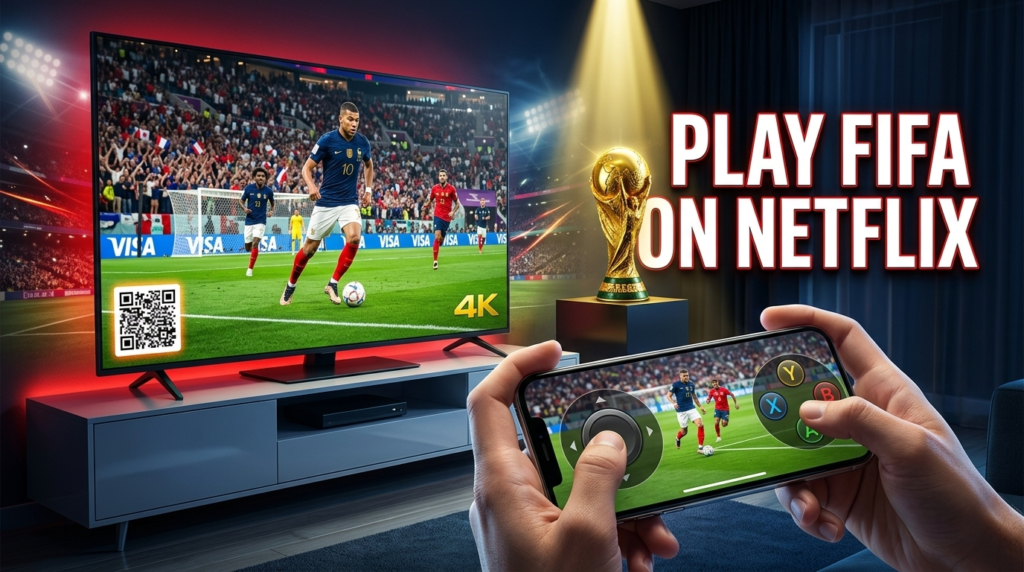
The trade-off is in how you control it. Instead of a traditional gamepad, your phone becomes the controller: half the screen is a virtual joystick, the other half handles shooting, passing, and tackling.
Is FIFA World Cup: Launch Edition Free with Netflix?
Yes. If you already pay for any Netflix plan, the game is included — there’s no in-app purchase, no premium unlock, and no ads. You do need an active subscription and access to Netflix Games, which is bundled into every tier.
Which Countries and Devices Support It?
Netflix Games on TV is currently a more limited rollout than Netflix’s video catalog, so availability depends on both your country and your device.
Supported countries (as of the current rollout): United States, Canada, the United Kingdom, France, Germany, Italy, Mexico, Spain, Austria, Australia, Belgium, Finland, Ireland, the Netherlands, New Zealand, Poland, South Africa, Sweden, Switzerland, and Brazil, with additional markets expected to be added over time.
Supported devices: The game runs on select smart TVs and connected TV devices that support Netflix Games, as well as desktop/laptop browsers via Netflix’s website. Your phone (iOS or Android) is used only as the controller — it isn’t where the game itself is displayed, so there’s no separate app installation required to launch it on TV.
If you don’t see “Games” as a tab in your Netflix TV interface at all, your TV model likely doesn’t support Netflix Games yet, regardless of your country.
Step-by-Step: How to Set Up and Play
- Open Netflix on a supported TV or in a desktop browser. Look for the “Games” tab in the main navigation, usually near “TV Shows” and “Movies.”
- Find FIFA World Cup: Launch Edition in the Games row. It’s typically featured near the top of the row given the current tournament.
- Select the game to bring up a QR code on screen. This code is what links your phone to that specific TV session.
- Open the camera app on your phone and scan the QR code. You don’t need to install anything separately — scanning takes you straight into the controller interface in your mobile browser or the Netflix app.
- Wait for the controller screen to confirm the connection. Once paired, your phone becomes a touchpad and joystick, and the match itself plays out on your TV or desktop screen.
- Choose your game mode, pick a team, and kick off. Up to four phones can connect to the same session for local multiplayer.
If the QR code disappears or times out before you finish scanning, simply re-select the game on your TV to generate a fresh code.
The Three Game Modes Explained
FIFA World Cup: Launch Edition launched with three core modes:
- Kick Off — A quick single match. Pick any two of the 48 national teams, choose a stadium, and select day or night conditions. This is the fastest way to jump into a game solo against the AI or with a friend locally.
- Tournament — A full run through the actual 2026 World Cup structure: 12 groups of four teams, three group matches each, then knockout rounds all the way to the final. You pick your country, adjust your lineup and formation from the real 26-player squad, and your progress saves automatically so you can continue later.
- Penalty Shootout — A fast, standalone mode built around the tension of a shootout, useful for short sessions or settling a quick head-to-head.
Because it’s labeled a “Launch Edition,” Netflix and FIFA have both indicated that additional modes, depth, and refinements are planned as the tournament progresses.
Common Setup Problems and How to Fix Them
The QR code won’t scan. Make sure your phone’s camera has a clear, well-lit view of the screen and that you’re not trying to scan through a phone case with glare. If scanning still fails, use the in-app option (where available) to manually enter the on-screen pairing code instead.
Games tab is missing entirely. This almost always means your specific TV model or streaming device isn’t yet part of the Netflix Games rollout. Try a desktop browser instead, since browser support is broader than TV support right now.
Controller feels laggy or unresponsive. Since your phone is communicating with your TV over your home Wi-Fi, a weak or congested connection is the usual culprit. Moving your router closer, switching to 5GHz Wi-Fi if available, or closing other bandwidth-heavy apps on your network often resolves this.
A friend’s phone won’t join the same match. Confirm they’re scanning the same QR code displayed on the active TV session, not an old one from a previous game. Each session generates a new code.
The game logs you out mid-match. This typically happens if your Netflix session times out or another device signs in using the same profile. Restarting the game session usually reconnects everything without losing tournament progress, since matches save after each game.
Is FIFA World Cup: Launch Edition Actually Worth Playing?
It’s worth setting realistic expectations here rather than treating this as a AAA football sim. Reception has been genuinely mixed. Some outlets have been sharply critical of the visuals and controls compared to console-grade football games, arguing the phone-as-controller format compromises precision. On the other hand, plenty of casual players — particularly families or groups without a console handy — have responded well to how quickly they can start a match with zero setup cost or hardware.
The honest takeaway: if you’re expecting something that rivals EA Sports FC or eFootball in depth and control precision, you’ll likely be disappointed. If you’re looking for a free, low-friction way to kill twenty minutes during halftime of a real match, or to settle a friendly rivalry with whoever’s on the couch, it does what it’s built to do.
Frequently Asked Questions
Do I need to download anything to play FIFA on Netflix? No separate app installation is required for the TV or desktop version. Your phone acts as the controller through your browser or the Netflix app after scanning the on-screen QR code.
Can I play FIFA World Cup: Launch Edition offline? The Kick Off and Tournament modes support playing solo against the AI, but you’ll need an internet connection to launch the game and pair your phone, since it streams through Netflix.
How many players can play at once? Up to four players can connect their phones to the same TV session for local multiplayer.
Can I choose club teams, or only national teams? Launch Edition includes only the 48 national teams competing in the 2026 World Cup — there are no club teams in this version.
Will FIFA World Cup: Launch Edition get more features later? Yes. Netflix and FIFA have both said the game will receive additional depth, modes, and technical refinements as the tournament continues, consistent with its “Launch Edition” framing.
Is this the same as EA Sports FC? No. EA Sports FC is a separate, unrelated franchise released after EA and FIFA ended their long-running naming partnership. Launch Edition is FIFA’s own return to football simulation games, built with a different developer and a different, more casual control scheme.
Does playing cost anything beyond my Netflix subscription? No. It’s included with every Netflix plan at no additional charge, with no ads and no in-game purchases.
This guide will be updated as Netflix expands device and country support for Netflix Games. If you run into a setup issue not covered here, Netflix’s official Help Center has the most current device compatibility list.